
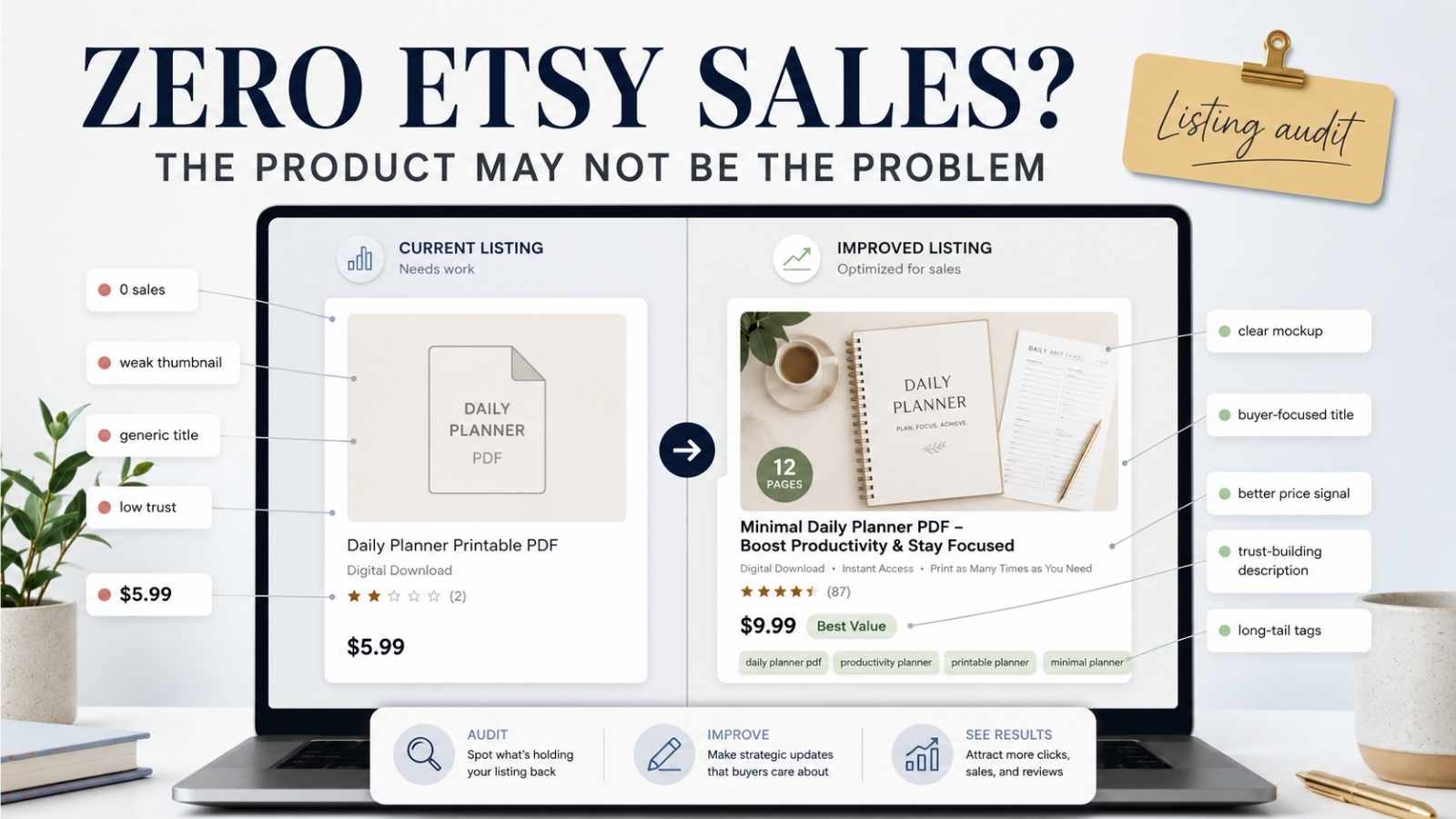
I have two listings on my Etsy shop. Both are digital products. Both are priced at $5.99. Both have descriptions and images.
And both have zero sales.
For a while I assumed the products were the problem. Maybe nobody wanted a freelancer tax tracker. Maybe the budget planner was too generic. I kept telling myself I needed better products before anything would sell.
Then I spent several weeks studying over 20 successful digital product shops on Etsy, specifically premium ADHD Notion template sellers and high-performing finance template listings. And I realized something that changed how I think about Etsy entirely.
My products were not the problem. My listings were not doing enough work. This is not a success story yet. It is a listing audit from the messy middle.
A listing is not just a product page. For a new shop with zero reviews, a listing is the only trust signal you have. Established sellers have hundreds of reviews, Star Seller badges, and years of conversion history working for them. Your listing has to build that same trust from scratch, without any of those shortcuts.
This article is about what I found when I looked at my listings honestly, what I am fixing, and what every beginner Etsy seller should understand about why zero sales is almost always a listing problem before it is a product problem.
Quick Summary: What I Found and What I Fixed
For scanners who want the answer before the explanation, here is the full picture:
| Listing problem | Why it hurts sales | What to fix |
|---|---|---|
| Weak thumbnail | Buyers do not click | Create a professional product mockup in Canva |
| No product video | Product feels unclear | Add a 30 to 45 second screen recording walkthrough |
| Price too low | Signals poor quality | Use confident mid-range pricing for your category |
| Generic title | Misses buyer search intent | Lead with keyword plus a benefit or problem statement |
| Feature-heavy description | Buyer does not feel understood | Rewrite opening around the buyer’s pain point |
| Broad single-word tags | Buried in competition | Replace with long-tail buyer intent phrases |
| No objection handling | Buyer hesitates and leaves | Add FAQ-style answers to common questions in description |
Every one of these was a problem in my listings. The sections below explain exactly what I found and how I am fixing each one.
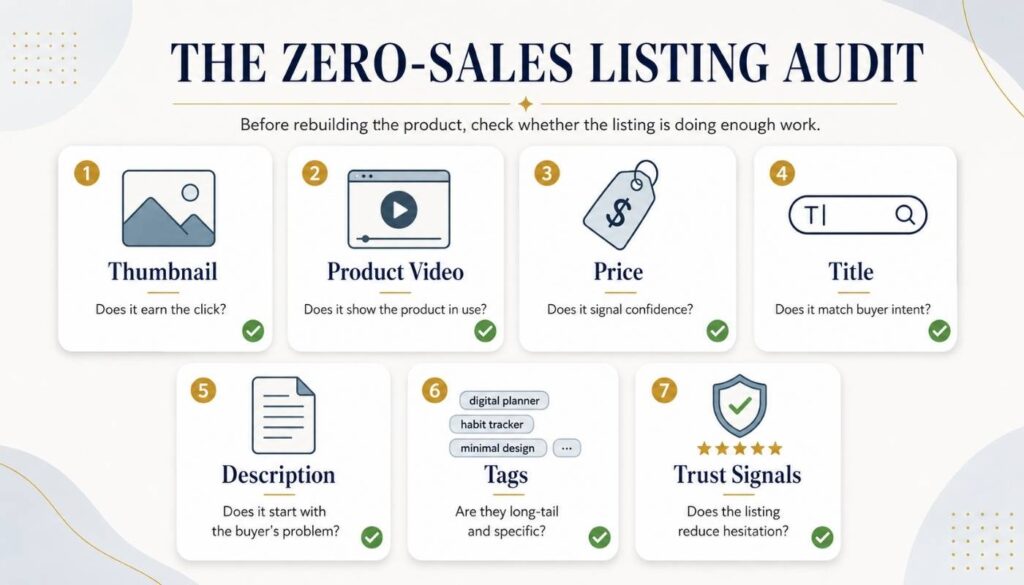
Table of Contents
The Real Problem: You Are Not Competing on Product Quality
You are competing against trust. And new sellers start with none.
This is the uncomfortable truth about selling on Etsy as a beginner. When a buyer searches for a “freelancer budget template” and sees your listing sitting next to a shop with 847 sales and 200 five-star reviews, they are not making a rational product comparison. They are making a trust decision in about three seconds.
The established seller has social proof. Every review is a previous buyer saying, “This worked for me.” Every sale is evidence that real people found value in this product. The Etsy algorithm reads that history too and rewards it with better placement in search results.
Your listing has none of that. So the buyer’s brain fills the gap with uncertainty. “Why does this shop have zero sales? Is something wrong with the product? Is this seller reliable?”
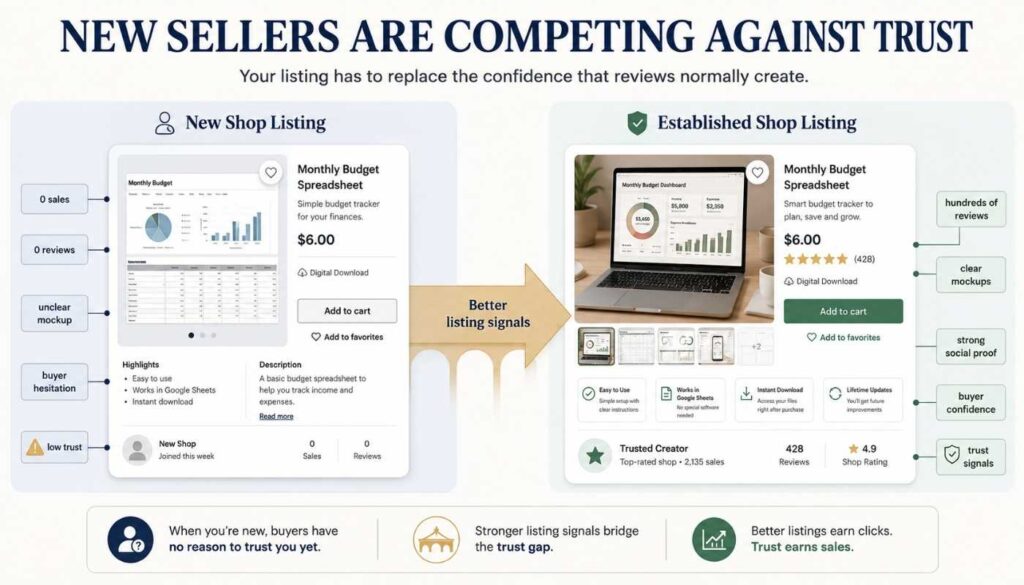
The instinct of most new sellers is to lower the price to compensate. I did this. I priced my templates at $5.99, thinking the low price would remove the hesitation. But here is what I learned from studying the market. Pricing too low does not remove the uncertainty. It adds to it.
When a buyer sees your template priced at $3 next to a similar template priced at $15 with 300 reviews, they do not think “great deal.” They think, “Why is this so cheap? What is wrong with it?” Price communicates quality before the buyer reads a single word of your description.
The listings that convert without social proof are the ones that compensate for the lack of reviews through every other trust signal available. Better visuals. Clearer descriptions. Smarter keywords. More specific positioning. That is what I had to fix.
The Video and Visual Gap: Why This Hurts More Than You Think
When I compared my listing images to the top sellers, the gap was obvious immediately.
My product video and mockup images look novice next to the professional sellers. Not dramatically bad. Just noticeably less polished. And in a marketplace where buyers make a judgment in three seconds, noticeably less polished translates directly into fewer clicks.
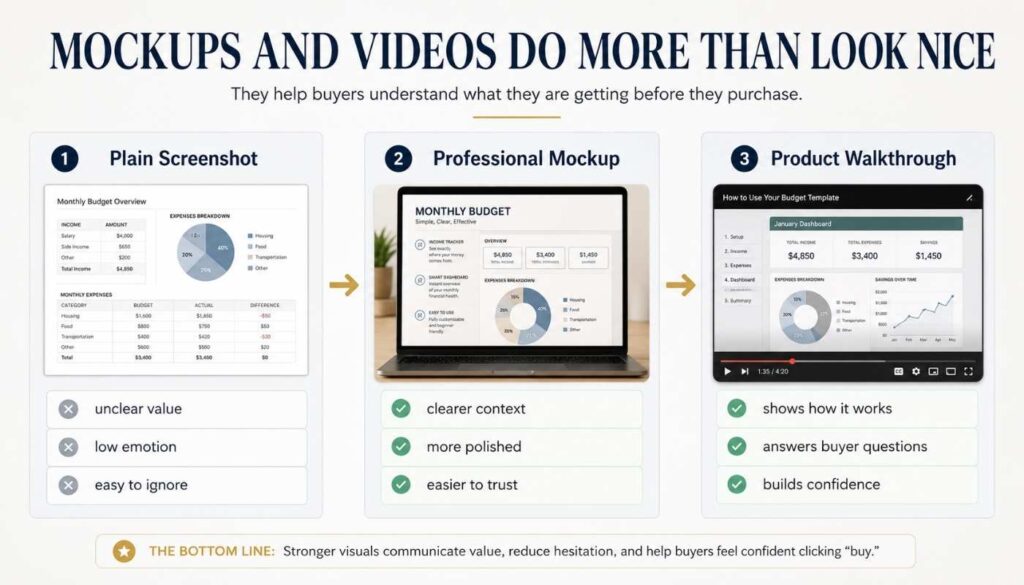
Here is what I noticed in the top-performing listings:
Their mockups tell a story
They do not just show the product. They show the product being used. A Notion template displayed inside a MacBook mockup with a clean desk background communicates “this is a professional, organized system.” The same template shown as a plain screenshot communicates nothing about the feeling of using it.
Their videos show the product in action
The best product videos I studied opened with the problem, showed the solution, and gave a quick tour of the key features. All within 30 to 45 seconds. According to Etsy’s own guidance, product videos can increase transparency, build buyer confidence, and communicate details that photos alone cannot show. For digital templates specifically, a simple screen recording showing the product being used helps buyers understand exactly what they are getting before they purchase.
Mine opened with a static image that slowly faded into another static image. That is not a video. That is a slideshow. It does not show the product working. It does not build confidence. It does not answer the buyer’s most important question: “What will this actually look like when I use it?”
Their thumbnails are consistent
Top shops have a visual identity. The same color palette, the same font style, the same mockup aesthetic across every listing. This consistency makes the shop look established, even if the review count is modest. My listings have no consistent visual identity because I had not thought about the shop as a brand yet.
The fix here is not as hard as it looks. Canva has free Notion mockup templates, laptop frames, and product mockup layouts. A professional-looking thumbnail takes 20 minutes of intentional design in Canva versus 5 minutes of placing a screenshot. A screen recording walkthrough using Loom or another free tool takes 10 minutes to create.
These are not big tasks. They are tasks I had not prioritized. That is on me.
The Pricing Trap: What Your Price Actually Communicates
The right price is not the lowest price. It is the price that communicates confidence.
I priced my templates at $5.99 because I was afraid. Afraid that nobody would buy from a zero-review shop at a higher price. What I did not realize is that I replaced one type of hesitation with another.
A very low price on a digital product tells the buyer one of two things:
A very low price tells the buyer one of two things
| 1 | The product has very little value |
| 2 | The seller does not believe in it enough to charge more |
Neither is the message you want to send. Price communicates quality before the buyer reads a single word of your description.
After studying how successful listings were priced, I noticed a clear pattern. The listings with traction were not the cheapest in their category. They were priced in the mid-range with strong visuals and clear descriptions that justified the price. The listings with zero traction were scattered across both extremes: either overpriced for an unproven shop or so cheap that buyers assumed there was a reason.
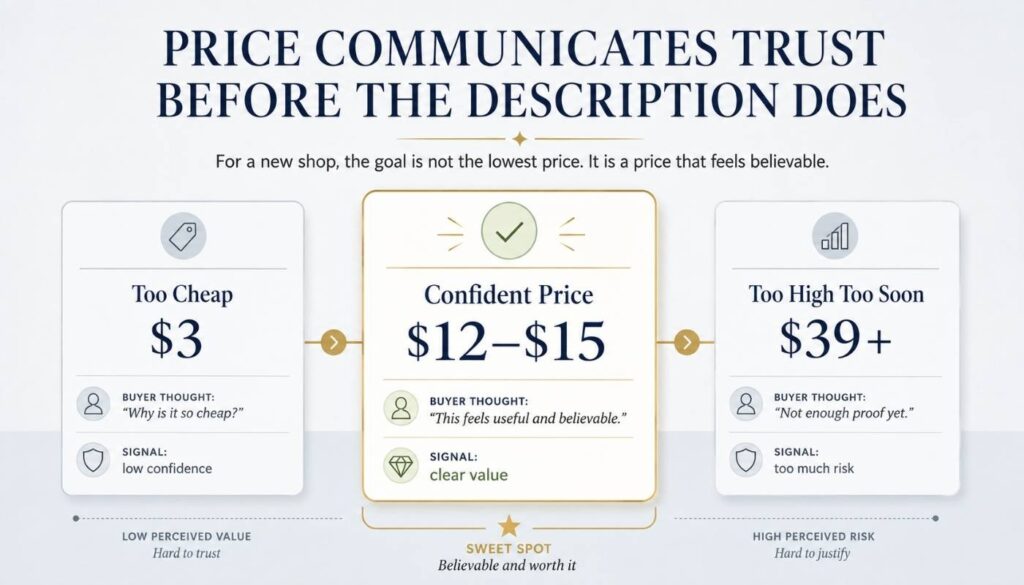
The sweet spot for a new seller with no reviews is not rock-bottom pricing. It is confident pricing. A price that says “I believe this product is worth this.” For a simple spreadsheet template, that is probably $9 to $15. For a Notion system template, $15 to $25. For a bundle, $25 to $40.
This connects to something I covered in detail in how to sell Notion templates on Etsy. You are not selling a file. You are selling the outcome that the file creates. A freelancer tax tracker is not worth $5.99 because it is a spreadsheet. It is worth $12 to $15 because it saves a freelancer hours of confusion at tax time every year. Price the outcome, not the object.
Before changing your price, run your numbers through this free Etsy Digital Product Pricing Calculator to see your actual profit after fees.
The Title Problem: Writing for Buyers, Not for Yourself
Most beginner Etsy titles describe the product. The best titles describe the problem the product solves.
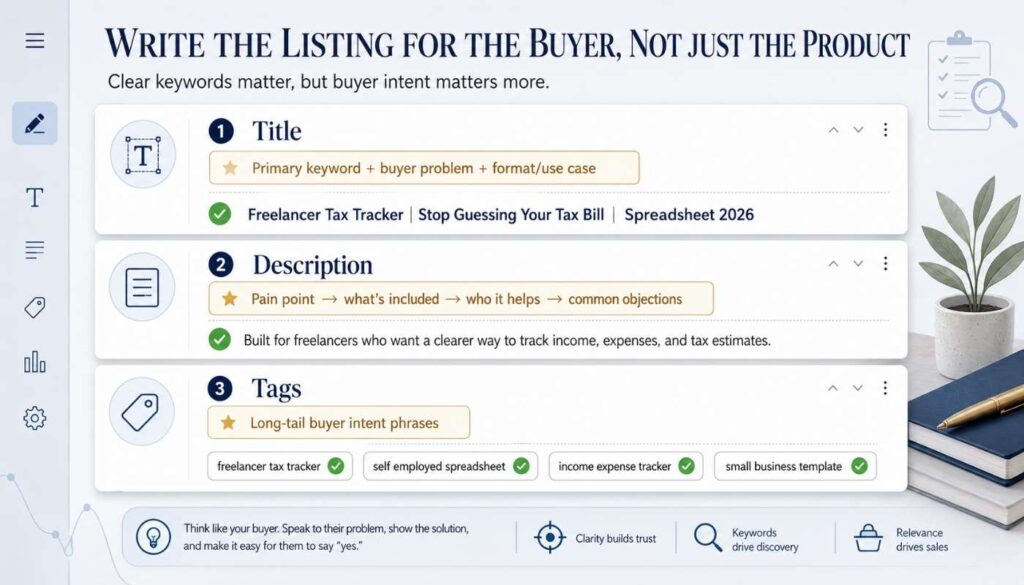
My current listing title for the tax tracker is essentially “Freelancer Tax Tracker 2026 Spreadsheet Template.” That is a description. It tells the buyer what the product is, but it does not tell the buyer why they should care.
Compare that to something like “Freelancer Tax Tracker | Stop Guessing Your Tax Bill | Self-Employed Income and Expense Spreadsheet 2026.” Same product. Completely different message. The second title answers the question the buyer is actually asking: “Will this solve my problem?”
The pattern I found in successful Etsy titles:
How successful Etsy titles are structured
| 1 | Primary keyword first. Etsy weights the beginning of your title more heavily — the most important search term goes at the start, not buried in the middle |
| 2 | A benefit or problem statement in the middle. Not a feature list — a clear statement of what the buyer gains or what problem this solves |
| 3 | Secondary keywords at the end. Format, platform, year, use case — fills in the remaining characters without sounding stuffed. Use all 140 characters |
The character limit is 140. Most beginners use about 60. The top sellers use 130 to 140, packing in every relevant keyword and benefit phrase while still reading naturally.
My titles were written quickly when I first opened the shop. They describe my products accurately but communicate no value, and they miss several keyword opportunities that buyers are actually searching for. That is the next thing I am fixing.
The Description Gap: Writing for the Buyer Holding Your Product
Nobody reads a wall of text. They scan for the answer to one question: Is this for me?
Imagine a buyer standing in a physical store holding your product. They flip it over to read the back. What do they need to see in the first five seconds to decide whether to put it in their cart?
That is how Etsy listing descriptions should be written.
What strong digital product descriptions do
Lead with the buyer’s pain, not the product’s features. “Are you spending hours manually tracking which clients paid and which invoices are overdue?” is more compelling than “This template includes 12 columns and color-coded conditional formatting.”
Describe what is included concisely. After the opening hook, a brief bulleted list of what is inside. Not a paragraph. A list. Four to six items maximum.
Specify exactly who it is for. “Designed for freelancers, consultants, and solo business owners who invoice multiple clients per month.” Specificity builds trust. Generic language (“for anyone who needs to track money”) sounds like you built the product for nobody in particular.
Answer common objections. For digital products, these are usually: Is this easy to use? Do I need special software? How do I get access after purchase? A brief FAQ-style section at the bottom addresses these before the buyer has to ask.
My current descriptions start with the product description instead of the buyer’s problem. That is the single change that would have the biggest impact if I made it today.
The Tag Strategy: Intent Over Popularity
The mistake most new sellers make is chasing popular tags. The winning move is matching buyer intent.
Etsy gives you 13 tags per listing. Most beginners use broad single-word tags like “template,” or “planner,” or “digital” because those seem like what buyers would search. The problem is that broad tags place you in massive, competitive pools where a zero-review listing will never surface.
The better strategy is long tail, intent-specific tags:
| Weak tag (avoid) | Strong tag (use instead) |
|---|---|
| template | freelancer invoice template |
| planner | ADHD daily planner digital download |
| digital | income and expense spreadsheet for freelancers |
These are phrases real buyers type when they are ready to purchase. They match specific buyer intent rather than broad category labels.
The practical process I now use:
Go to the Etsy search bar and type your primary keyword. Look at the autocomplete suggestions. Those are real phrases buyers are searching right now. Use the most specific and relevant ones as your tags. Do this across 10 to 15 variations, and you will have more than enough intent-specific candidates to fill all 13 tag slots.
According to the Etsy Seller Handbook, using relevant keywords in your titles, tags, categories, and attributes helps your listings match what shoppers are searching for. Tags that match how buyers describe their problem perform better than tags that describe your product category.
What I Am Fixing First (In This Exact Order)
Fix one thing at a time. Start with the highest leverage change.
The temptation is to fix everything at once. That produces mediocre improvements across the board. Here is the order that makes the most impact:
Fix in this exact order — highest leverage first
| 1 | Main thumbnail image. This is what buyers see before they click. A professional Canva mockup takes 20 to 30 minutes and has immediate impact on click-through rate. No sale can happen without a click |
| 2 | Product video. A 30 to 45 second screen recording showing the product in use — this is the most noticeable gap between beginner listings and professional sellers |
| 3 | Listing title. Primary keyword at the front, benefit or problem statement in the middle, secondary keywords at the end |
| 4 | Price. If you are priced under $8 for anything beyond a simple single-sheet template, consider whether that price communicates value or uncertainty |
| 5 | Description. Rewrite the first paragraph to lead with the buyer’s problem, not the product’s features |
| 6 | Tags. Replace any broad single-word tags with long-tail intent-specific phrases from Etsy’s search autocomplete |
How I Will Know If the Fixes Are Working
The fix depends on where in the listing journey buyers are dropping off.
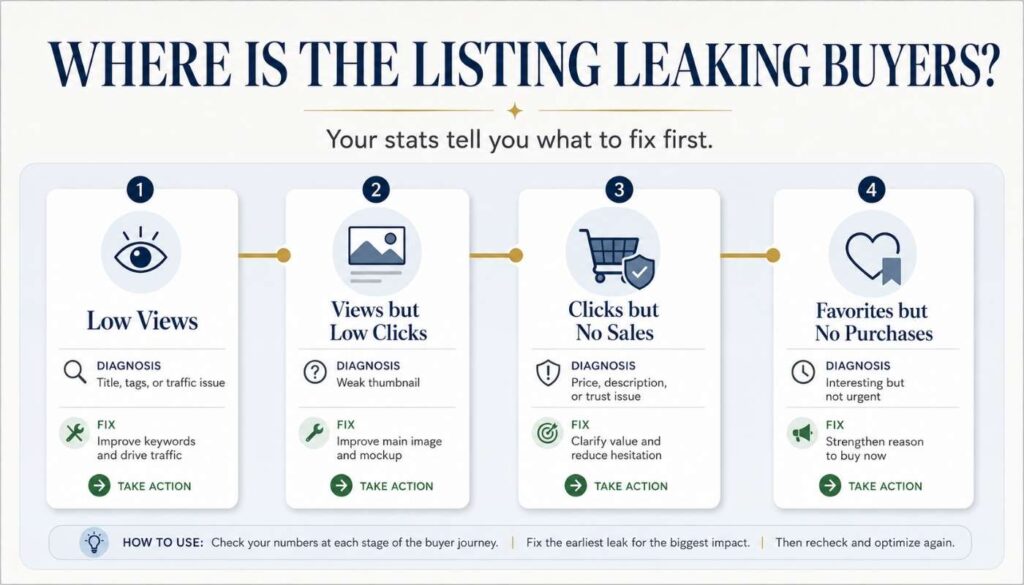
This is the section most Etsy guides skip. They tell you what to fix but not how to know which fix your specific listing actually needs. Etsy’s shop stats page shows you exactly where the drop-off is happening.
If your listing views are very low, the problem is likely your title, tags, or external traffic. Your listing is not appearing in searches. Fix keywords first, then drive Pinterest traffic.
If views are decent but clicks to your listing are low, the thumbnail is probably weak. Buyers are seeing your listing in search results but not clicking. The image is not compelling enough to earn the click.
If clicks are happening but sales are not converting, the problem is likely price, description, trust signals, or mockup quality. The buyer is interested enough to click but not convinced enough to purchase.
If people are favoriting your listing but not buying, the product is interesting but not urgent enough. The description may not be communicating a clear enough reason to buy now rather than save for later.
Each of these is a different problem requiring a different fix. Knowing which one you have tells you exactly where to start. My listings currently have almost no views, which tells me the title, tags, and traffic are the primary issues. That is where I am starting.
Frequently Asked Questions
Why am I getting no sales on Etsy if my product is good?
In most cases, zero Etsy sales on a new shop are a listing problem, not a product problem. Your listing needs to communicate value, build trust, and match buyer search intent, all without the help of reviews or sales history. The most common issues are weak mockup images, titles that describe the product instead of solving a problem, prices that are too low and signal poor quality, and tags that are too broad to match specific buyer intent.
Should I lower my Etsy price to get my first sale?
Not necessarily. Very low prices on digital products can signal poor quality rather than good value. A better approach is to price in the mid-range for your category while investing in stronger visuals and clearer descriptions that justify the price. The first sale is more likely to come from a buyer who trusts your listing than from a buyer drawn in by the lowest price.
How important are Etsy listing videos for digital products?
Listing videos can be very helpful for digital products because they show the product in use, not just what it looks like. According to Etsy’s own guidance, product videos can increase transparency, build buyer confidence, and communicate details that photos alone may not show. For templates, a simple 30 to 45 second screen recording showing the product being used helps buyers understand exactly what they are getting before they purchase.
How many tags should I use on Etsy?
Use all 13. Every unused tag is a missed opportunity to appear in a relevant search. The best tags are multi-word phrases that match specific buyer search intent rather than broad single words. Use Etsy’s own search autocomplete to find phrases real buyers are searching for and build your tags around those suggestions.
How do I write Etsy listing descriptions that convert?
Lead with the buyer’s problem in the first sentence. Follow with a brief bulleted list of what is included. Specify exactly who the product is for. Then answer the most common objections about ease of use, required software, and how to access after purchase. Keep paragraphs short and sections scannable. The buyer deciding in 10 seconds whether to purchase needs the most important information immediately, not buried three paragraphs down.
How do I know which part of my Etsy listing needs fixing?
Check your Etsy shop stats. If views are low, the issue is titles, tags, or traffic. If views are decent but purchases are low, the issue is thumbnail, pricing, or description. If people are favoriting but not buying, the offer may not feel urgent enough. Each pattern points to a different fix, so diagnose before you change everything at once.
How do I compete with established Etsy shops as a new seller?
You cannot match their review count, but you can match their listing quality. Professional mockup images, benefit-focused titles, niche-specific positioning, and strong descriptions put your listing in the same visual trust tier as theirs. Pair that with a confident price point, consistent Pinterest traffic from your blog and content, and niche specificity that larger shops ignore, and you can compete on the factors you can actually control.
When should I update my Etsy listings?
Update your listings whenever you notice that views are very low (title and tag problem) or when views are decent, but conversions are low (description, mockup, or pricing problem). Etsy’s stats page shows views, favorites, and purchases, and that pattern tells you exactly where the drop-off is happening in your specific listing.
Final Thoughts
I have two listings and zero sales. I am not embarrassed by that anymore.
When I started, I thought the zeros meant the products were wrong. After studying how successful shops build their listings, I realize the zeros mean I was asking my listings to do less work than they needed to.
My mockups were adequate, not compelling. My titles described my products without solving a problem. My descriptions started with features instead of pain points. My price said “I am not sure this is worth more” instead of “this is exactly what you need.” My video was a slideshow, not a demonstration.
None of those are product problems. They are all fixable.
If you are a beginner Etsy seller with zero or very few sales, the most productive question is not “should I build a different product?” It is “is my listing doing everything it can to earn a buyer’s trust before they see a single review?”
For most of us, the honest answer is no.
And that is the good news. Because every element of a listing can be improved. The product you already have may be exactly right. It just needs a listing that works as hard as you do.
I am working through mine. One fix at a time.
Leave a Reply